# Rayyan vs Covidence in 2026: which screening tool to choose
> Rayyan vs Covidence compared for screening, data extraction, risk of bias and the PRISMA diagram: prices, free plan limits and AI features in 2026.
Published at https://revisia.es/en/blog/rayyan-vs-covidence/ · Author: Ángel González de la Flor · Date: 2026-10-12
Screening is the phase of a systematic review in which you decide which studies make it into your analysis and which ones are dropped. After the [literature search](/en/blog/literature-search-strategy/) you end up with hundreds or thousands of references, and you can rarely read every full text. Rayyan and Covidence exist to organize that work, split it between reviewers and keep a record of every decision.
The comparison no longer comes down to "Rayyan is free and Covidence is complete". Rayyan offers paid plans, data extraction, a risk of bias tool and a PRISMA diagram. Covidence is still more expensive, but it brings paired screening, dual extraction, quality assessment and PRISMA reporting together in one workflow. The choice depends on the size of the team, the budget and how much of the work you want to keep inside the platform.
If you want to see screening within the whole process, go back to the [guide to the systematic review step by step](/en/blog/what-is-a-systematic-review/), where it fits as one of the core phases of the method.
## What screening is in a systematic review
Article screening is the process of **study selection**: starting from the full set of references retrieved by the search, you filter until you keep only the studies that answer your research question and meet your eligibility criteria.
Selection is always made against the [**inclusion and exclusion criteria**](/en/blog/inclusion-and-exclusion-criteria/) you defined in advance (population, intervention, study design, language, dates and so on). It is not about discarding on instinct but about applying explicit, reproducible rules, so that any other researcher would reach the same result with your criteria.
Screening matters for two reasons:
- Rigor: what sets a systematic review apart from a narrative review is precisely the transparency of the selection process. Anyone who reads your work must be able to reconstruct why each study ended up in or out.
- Traceability: every exclusion counts. The number of references imported, the duplicates removed and what is discarded at each phase is what feeds the [PRISMA flow diagram](/tools/en/prisma-flow-diagram/), the chart that documents all the filtering visually.
That is why "cleaning up the list" falls short as a description: screening is a methodological phase with its own rules, two separate steps and, almost always, two reviewers working in parallel.
## Title and abstract screening vs full-text screening
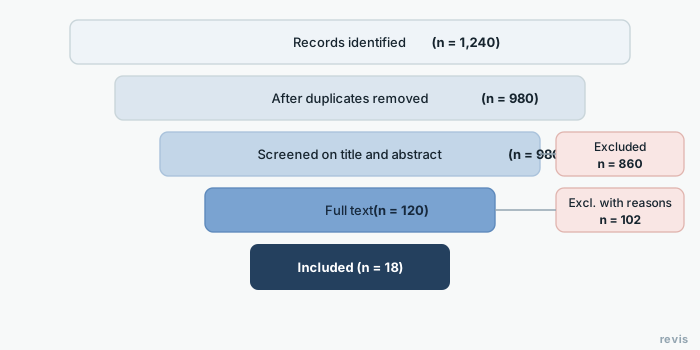
Screening happens in two successive phases. Keep them separate, because they have different goals and different levels of strictness.
### Phase 1: title and abstract screening
**Title and abstract screening** is the first filter. Here you only read the surface information of each reference (the title and, if there is one, the abstract) and decide quickly: could this study be relevant, or is it clearly not? It is also the part that takes the most hours in the whole review. The guide on [how long a systematic review takes](/en/blog/how-long-does-a-systematic-review-take/) has the measured times, phase by phase.
What this phase looks like:
- It is fast and high volume: you can go through hundreds of records in a session.
- The criterion is lenient: when in doubt, include. If an abstract does not give enough information to rule the study out, it moves on to the next phase. A false positive (a study that will be excluded later) is better than losing a relevant one.
- You do not need the full document, which makes it ideal for tools like Rayyan that import references from a RIS file or straight from the database.
### Phase 2: full-text screening
In the second phase you retrieve the **full text** of the studies that survived the first filter and read them closely to confirm they meet every eligibility criterion.
What this phase looks like:
- It is slower and more demanding: now you do read the methods, population and results.
- The criterion is strict: every study you exclude at this phase must carry a recorded **reason for exclusion** (for example, "non-randomized design", "population outside the age range", "outcome not measured"). Those reasons are required for the PRISMA diagram.
- This is where access becomes a problem: you will not always have the PDF at hand. A [reference manager](/en/blog/mendeley-vs-zotero/) such as Mendeley or Zotero helps you find and store full texts before this phase.
The difference between the two phases: at title and abstract you filter for quantity; at full text you confirm eligibility and document why you drop each study.
### Blinded dual screening
In both phases, the methodological standard is **duplicate screening with decisions hidden between reviewers** (usually called "blinded" or "dual" screening). Two reviewers screen independently, without seeing each other's decisions, and then compare results. Disagreements are resolved by consensus or with a third reviewer.
Why do it this way? Because study selection introduces bias when a single person does it. Blinding reduces reviewer bias and lets you calculate the agreement between the two (for example, with Cohen's kappa). Both Rayyan and Covidence are designed to hide the other reviewer's decisions during screening and reveal them only at the conflict resolution stage.
## Rayyan: what the free plan includes today
[Rayyan](https://www.rayyan.ai/) started out as a screening tool at the Qatar Computing Research Institute (QCRI). That is still what it is best known for, but the current platform also includes full-text screening, data extraction, risk of bias assessment and a PRISMA diagram.
The workflow starts outside Rayyan. First you search PubMed, Scopus or other [bibliographic databases](/en/blog/databases-for-systematic-reviews/) and export the references. Then:
1. You import RIS, EndNote, CSV or BibTeX files.
2. Rayyan detects duplicates and organizes the references for screening.
3. Each reviewer marks "Include", "Exclude" or "Maybe". Blind mode hides decisions until the team resolves the conflicts.
4. The studies that pass move on to full-text screening. You can attach the PDF and record the reason for each exclusion.
5. The platform lets you build extraction forms and assess the risk of bias of randomized trials with RoB 2.
According to [Rayyan's pricing page](https://www.rayyan.ai/pricing), the Free plan allows three active reviews, two invited reviewers, one sample and relevance predictions. That AI is a classifier that ranks references based on your earlier decisions. It helps you prioritize, but it does not replace the reviewer's vote.
There are two limits worth knowing before you start:
- The PRISMA diagram is not included in Free. It is available from Essential, which costs US$4.99 per seat per month billed annually and also adds automatic duplicate resolution and AI-assisted PICO extraction. Advanced costs US$8.33 on the same terms.
- ResearchPilot, the suite that includes AI Reviewer and automated extraction, is reserved for institutional contracts. The [official getting started guide](https://help.rayyan.ai/hc/en-us/articles/22697630697617-Getting-Started-with-Rayyan) separates this suite from the relevance predictions in the free plan.
Rayyan also has [structured data extraction](https://help.rayyan.ai/hc/en-us/articles/45962305781009-How-to-Set-Up-Data-Extraction-in-Rayyan) and a [risk of bias](https://help.rayyan.ai/hc/en-us/articles/46607683693073-How-to-Assess-Risk-of-Bias-in-Rayyan) tool. For the latter, Rayyan announces support for RoB 2, ROBINS-I, QUADAS-2, Newcastle-Ottawa, JBI and AMSTAR 2, plus its own templates. The interface and the help center are in English.
## Covidence: an integrated workflow priced per review
[Covidence](https://www.covidence.org/reviewers/) covers import, title and abstract screening, full-text screening, extraction, quality assessment and PRISMA export. It is part of Cochrane's review production environment, although it is also used outside Cochrane reviews.
Its usual workflow is this:
1. You import the references. Covidence detects duplicates and keeps a history of the sources.
2. Two reviewers vote independently at title and abstract. Conflicts go to consensus.
3. At full text you attach the PDFs, record the reasons for exclusion and resolve disagreements again. Covidence tries to retrieve some open-access PDFs automatically.
4. Extraction can be done in duplicate with customizable templates and a consensus step.
5. Quality assessment can be built into the template. [Covidence's current documentation](https://support.covidence.org/help/faq-which-risk-of-bias-tool-does-covidence-use) says its standard template is based on the original Cochrane risk of bias tool (RoB 1) and that Extraction 2 lets you customize it. It should not be described as a native RoB 2 form.
6. The PRISMA diagram updates as the project moves forward and can be downloaded as a DOCX file so you can correct any fields that need manual adjustment.
The [public price](https://www.covidence.org/pricing/) is US$339 for one review for twelve months, with unlimited collaborators. The three-review package costs US$907 a year. The free trial allows up to 500 records; it is not a free full review.
Before you pay, ask your university library. Covidence sells institutional licenses, and many organizations let their members create reviews under that subscription.
If you would rather screen with automatic PRISMA traceability, in revisia artificial intelligence speeds up screening and every uncertain call stays in your hands. Create your free account.
## Rayyan vs Covidence (table)
Rayyan is the budget option for getting started with screening. Covidence costs quite a bit more and pays off when the team needs a stable dual-reviewer workflow, from screening through extraction and quality assessment, or already has an institutional license.
| Feature | Rayyan | Covidence |
|---|---|---|
| Public price | Free; Essential from US$4.99/month per seat, billed annually | US$339/year for one review; 500-record trial |
| Entry limit | Free: 3 active reviews and 2 invited reviewers | One review and unlimited collaborators on the Single plan |
| Database searching | No; imports files from other sources | No; imports files from other sources |
| Title and abstract screening | Yes | Yes |
| Full-text screening | Yes, with PDFs and exclusion reasons | Yes, with PDFs, reasons and retrieval of some open-access papers |
| Blinded dual screening | Yes | Yes |
| Duplicates | Detection on Free; automatic resolution from Essential | Automatic detection and quarantine |
| AI assistance | Relevance prediction on Free; PICO from Essential; ResearchPilot for institutions | RCT classifier and occasional extraction suggestions |
| Data extraction | Structured forms; automation with ResearchPilot | Customizable templates, dual extraction and consensus |
| Risk of bias assessment | RoB 2, ROBINS-I, QUADAS-2 and other tools, according to Rayyan | RoB 1 template and customizable quality assessment |
| PRISMA diagram | From Essential; mixes automatic and manual fields | Included; updates with the workflow and exports to DOCX |
| Backing / endorsement | QCRI (origin) | Cochrane |
| Interface language | English | English |
| Best fit if... | You want to screen on a small budget and can handle the missing steps elsewhere | You need paired reviewer coordination in a single environment or have an institutional license |
If you choose Rayyan Free, decide from the start where you will build the PRISMA diagram and how you will handle extraction and the quality tool that matches your study designs. If you choose Covidence, check your institution's license first, and remember that it does not run the literature search either: the references still come from external databases.
## How to record exclusions for the PRISMA diagram
Having the list of included studies is not enough to close screening: you also need to be able to explain every exclusion. The PRISMA flow diagram requires you to report how many records came in, how many were duplicates, how many were excluded at title and abstract screening and how many at full text, the latter with their reasons.
To make those numbers add up at the end, record them as you screen:
- Total records identified from each database and other sources.
- Duplicate records removed (Rayyan and Covidence detect and count them).
- Records excluded at title and abstract (you do not need an individual reason here, but you do need the total).
- Full-text reports assessed for eligibility and, of those, the ones excluded with reasons grouped by category (design, population, language, outcome, etc.).
- Studies included in the final synthesis.
Covidence updates the diagram as you go: it records imported references, duplicates, decisions and exclusion reasons. Its [PRISMA export guide](https://support.covidence.org/knowledge_base/topics/export-prisma) notes that the DOCX may still need adjustments, for example if there were studies whose full text could not be retrieved.
Rayyan generates a PRISMA 2020 diagram on its paid plans. According to its [PRISMA documentation](https://help.rayyan.ai/hc/en-us/articles/45959279429649-How-to-Create-a-PRISMA-Flow-Diagram-in-Rayyan), it fills in duplicates, records screened and excluded, reports sought for retrieval and exclusion reasons automatically. You have to enter by hand the databases searched, reports not retrieved, reports assessed for eligibility and studies included. Rayyan also pools the exclusion reasons from title/abstract and full-text screening, so you may need to separate those counts before publishing.
Once you have the numbers, carry them over to the final chart by following the [guide to the PRISMA flow diagram and its editable template](/en/blog/prisma-flow-diagram/), where they slot into the identification, screening and included boxes.
In revisia the AI proposes the screening decision and you settle every uncertain one, with everything audited. Create your free account and start screening.
## Frequently asked questions
### How many phases does screening have?
Two: first by title and abstract, then by full text for the records that passed the first phase.
### What happens if the two reviewers disagree?
Disagreements are resolved by consensus or by a third reviewer. It is part of the method and should be recorded.
### Does screening AI decide for me?
It should not. A good tool prioritizes or suggests, but decisions and uncertain cases are settled with human judgment and recorded.
### What is Rayyan?
Rayyan is a platform for managing systematic reviews. It imports references retrieved from other databases, detects duplicates and lets you screen by title, abstract and full text. It also includes data extraction, RoB 2, a PRISMA diagram on paid plans and various AI features depending on the plan. It was originally developed at the Qatar Computing Research Institute (QCRI).
### Is Rayyan free?
Yes, with limits. Rayyan Free allows three active reviews, two invited reviewers, one sample and relevance predictions. The PRISMA diagram, automatic duplicate resolution and other features start on the paid plans. ResearchPilot, which includes AI Reviewer and automated extraction, is reserved for institutional contracts.
### Rayyan or Covidence?
Choose Rayyan if you want to start on a small budget and its limits on reviews and collaborators fit your project. Choose Covidence if you need dual extraction, consensus and an integrated workflow, or if your institution already pays for the license. Both import references from external databases; neither replaces the literature search.
### How does blinded dual screening work?
In blinded dual screening, two reviewers screen the same references independently, without seeing each other's decisions. Both Rayyan and Covidence let you turn on a "blind" mode that hides the rest of the team's votes during screening. Once both have finished, the tool shows the conflicts (the studies where they disagree), which are resolved by consensus or by a third reviewer. This procedure reduces reviewer bias and lets you measure inter-rater agreement.