revisia Log in Sign up
← Back

MCP connector

Use revisia from Claude or ChatGPT with the same method and rigour

The chat talks; revisia does the review: it searches, screens with verified quotes and builds the PRISMA. You sign off every stage. With no account you can already ask for a PRISMA diagram, a kappa or a risk of bias figure.

  • Free to connect
  • 4 tools with no account
  • You sign off every stage

Pick where you use it

Also in Cursor · VS Code · Claude Code · Other clients

Server URL

https://revisia.es/mcp

What it looks like in the chat

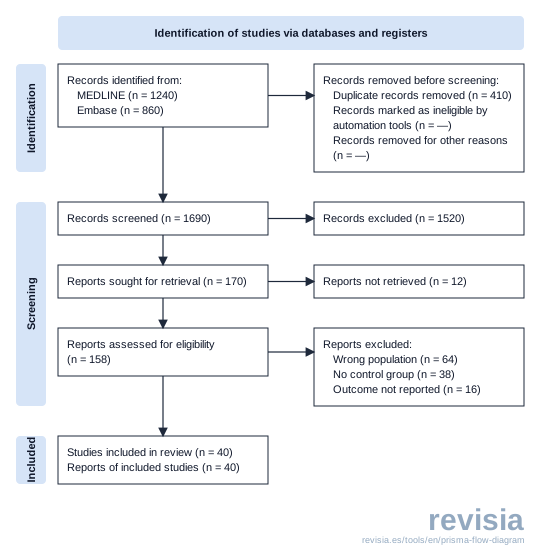
YouMake the PRISMA diagram: 1,240 records from MEDLINE and 860 from Embase, 410 duplicates, 1,690 screened, 1,520 excluded, 170 full texts, 12 not retrieved, 118 excluded and 40 included.
revisia · PRISMA 2020 diagram

2,100 records identified, 40 studies included. The numbers pass every consistency check.

PRISMA 2020 flow diagram returned by revisia: 2,100 records identified (1,240 from MEDLINE and 860 from Embase), 410 duplicates, 1,690 screened, 170 reports sought and 40 studies included.
The real figure returned by the tool, with no account: that is why it carries the revisia mark. Each client shows it in its own way.

What you can do

Two levels: no account and your account

Without an account you get the four free tools from the website. With your account, the chat works on your reviews.

No account

  • PRISMA 2020 flow diagram. Give it the counts for each phase and get the diagram, with a warning if the numbers do not add up.
  • Risk of bias figure. Traffic-light and summary plots for RoB 2, ROBINS-I, QUADAS-2, Newcastle-Ottawa and more. You can paste your table.
  • Inter-rater kappa. Cohen's or Fleiss' kappa, Gwet's AC1 and PABAK, with confidence intervals.
  • PRISMA 2020 checklist. Each item with its status and where it is reported, ready for the manuscript.

Computed, not generated: no AI writes the numbers. Figures carry a revisia mark that goes away when you sign in with a verified email.

  • Create the review. Start a new project from your question.
  • Criteria. Suggests inclusion and exclusion criteria for you to review.
  • Search. Builds the strategy, estimates how many records it will find and runs it.
  • Screening with verified quotes. Each decision comes with the sentence from the abstract that supports it.
  • Full text. Fetches open-access PDFs and screens on the full text.
  • Data extraction. Fills the data table with a quote from the paper for each value.
  • Risk of bias. Rates each study by domain and draws the figure.
  • PRISMA and export. The diagram with the project's real counts, and your data as RIS, BibTeX or CSV.

Everything goes through your account, with your plan's quotas and the usual verified quote. No stage is signed off from the chat.

Try these prompts

Copy them into your chat

Write the way you would ask a colleague. If you name revisia, the chat knows which tool to use.

  • No account

    PRISMA diagram

    Use revisia to make the PRISMA 2020 diagram: 1,240 records from MEDLINE and 860 from Embase, 410 duplicates, 1,690 screened, 1,520 excluded, 170 full texts sought, 12 not retrieved, 118 excluded (64 wrong population, 38 no control group, 16 outcome not reported) and 40 included.

  • No account

    Kappa

    Use revisia to work out the kappa for two reviewers who screened 200 abstracts: we both included 42 and both excluded 148; I included 6 that she excluded, and she included 4 that I excluded.

  • No account

    Risk of bias

    Here are my RoB 2 judgements for 8 trials. Use revisia to make the traffic-light and summary plots. [paste your table here]

  • No account

    PRISMA checklist

    Use revisia to prepare the PRISMA 2020 checklist for my manuscript: title and abstract are on page 1, and items 3 to 16 are in the Methods, pages 4 to 6.

  • Start a review

    Create a review in revisia on aerobic exercise and depressive symptoms in adults over 65, and suggest the inclusion and exclusion criteria.

  • Search

    Prepare the search for my revisia review and tell me how many records each database will return before running it.

  • Where am I

    What stage is my revisia review on vitamin D and fractures at, and what is the next step?

  • Screening

    Show me the papers that revisia's screening left for review, with the sentence from the abstract behind each decision.

Connect

Connect it in your client

It is the same address everywhere. The no-account tools work straight away. The first time you use something from your account, the client sends you to revisia to sign in.

Claude

claude.ai, desktop and mobile
  1. On claude.ai or in the desktop app, open Settings → Connectors.
  2. Click Add custom connector.
  3. Name it revisia, paste the server URL and click Add.
  4. If Claude asks when to sign in, choose to sign in only when needed. The free tools work straight away; revisia asks you to sign in only when you use your account.
https://revisia.es/mcp

The connector you add also shows up in the mobile app. Custom connectors depend on your Claude plan.

ChatGPT

chatgpt.com and desktop
  1. Open Settings → Apps and turn on developer mode in the advanced options.
  2. Click Create, name it revisia and paste the server URL.
  3. Choose OAuth sign-in and confirm. ChatGPT sends you to revisia when you use your account.
https://revisia.es/mcp

Developer mode depends on your ChatGPT plan.

Check that it works

Open a new chat and paste this. If the answer says κ = 0.86, you are connected.

Use revisia to work out the kappa: 42 included by both reviewers, 148 excluded by both, and 6 and 4 disagreements.

Editors and terminal

Cursor

editor

Add to Cursor Opens Cursor and asks you to confirm.

Or add it by hand to ~/.cursor/mcp.json (all your projects) or .cursor/mcp.json (one project):

{
  "mcpServers": {
    "revisia": {
      "url": "https://revisia.es/mcp"
    }
  }
}

VS Code

with GitHub Copilot

Add to VS Code Opens VS Code and asks you to confirm.

Or add it by hand to .vscode/mcp.json, or run MCP: Add Server and choose HTTP:

{
  "servers": {
    "revisia": {
      "type": "http",
      "url": "https://revisia.es/mcp"
    }
  }
}

Claude Code

terminal

Paste this command in your terminal:

claude mcp add --transport http revisia https://revisia.es/mcp

Then type /mcp inside Claude Code to sign in to revisia.

Other clients

Le Chat, Gemini CLI…

Any MCP client that supports remote servers over HTTP can use revisia: give it the server URL. The steps depend on each client; check its documentation.

https://revisia.es/mcp

Menu names change often between versions. If you cannot find one, search for “connector” or “MCP” in your client's settings.

Security and privacy

You decide what the chat can do

When the chat needs your account, you sign in to revisia, not to the chat. On that screen you pick the permissions:

Permissions you can grant

  • See your reviewsProjects, stages, counts and quotas. Always included.
  • Edit your reviewsCriteria, screening decisions and imports. You tick it.
  • Start AI tasksScreening, extraction and risk of bias, charged to your quota. You tick it.

You sign off the stages

The chat prepares criteria, decisions and tables. Approving a stage happens in the revisia web app, with your session.

Disconnect whenever you want

Under Account → Security and access → Connected apps you see every connected client and remove its access with one click.

What enters the chat is handled by that provider

What revisia returns goes into your conversation with that AI provider and falls under its privacy policy. Do not paste patient data or anyone's personal data.

Support and documentation

Help and reference

Something not working, or a question about the connector? Write to us.

Connector tools

Names as your client shows them.

ToolWhat it doesAccess
PRISMA 2020 flow diagramrevisia_prisma_flow_diagram Draws the PRISMA 2020 diagram from your counts and warns if they do not add up. No account
Risk-of-bias figurerevisia_risk_of_bias_figure Traffic-light and summary plots from your judgements. No account
Inter-rater agreement (kappa)revisia_interrater_agreement Cohen's or Fleiss' kappa, Gwet's AC1 and PABAK, with confidence intervals. No account
PRISMA 2020 checklistrevisia_prisma_checklist The PRISMA 2020 checklist filled with your answers, as Word and CSV. No account
How revisia worksrevisia_help revisia's guide for the assistant: the stages and what it may do.
Account statusrevisia_account_status Your plan, your quotas and the databases you can use.
Reviewsrevisia_projects Your reviews and the stage each one is at.
Create or edit a reviewrevisia_projects_act Creates a review or rewords its question.
Question and criteriarevisia_question The question, its concepts and the eligibility criteria.
Work on the question and criteriarevisia_question_act Checks the question and suggests or saves criteria.
Searchesrevisia_search The saved strategy and how many records it will return.
Build, run and import searchesrevisia_search_act Builds the strategy, runs the searches or imports a file.
Screening resultsrevisia_screening Screening decisions, with the quote from the abstract.
Run screening or record a decisionrevisia_screening_act Runs AI screening or records one decision.
Full textsrevisia_fulltext Which full texts are in and their decisions.
Fetch full texts or screen themrevisia_fulltext_act Fetches open-access PDFs and screens the full text.
Evidence tablerevisia_extraction The extraction table, with the quote for each value.
Define and run extractionrevisia_extraction_act Suggests and saves columns, and runs extraction.
Risk of biasrevisia_rob Judgements per study and domain, and the figure.
Run or record risk of biasrevisia_rob_act Runs AI risk-of-bias drafts or records a judgement.
Wait for a jobrevisia_jobs Waits for a long job and reports its progress.
Stage approvalrevisia_approve_stage Gives you the link to sign off the stage in the web app. It approves nothing.
PRISMA, Methods and manuscriptrevisia_report The project's PRISMA, the Methods paragraph and the manuscript.
Generate the manuscriptrevisia_report_act Writes the manuscript draft from the approved stages.
Export filesrevisia_export Decisions, RIS references, audit trail, risk of bias or protocol.

FAQ

Before you connect it

Does it cost anything?

Connecting it does not. Without an account you get the four free tools. With an account, the chat uses your revisia plan with the same quotas as the web app: there is no separate price.

Do I need a paid Claude or ChatGPT plan?

It depends on the client. Claude's custom connectors and ChatGPT's developer mode depend on the plan, and both companies change them often. If your plan does not have them, Cursor, VS Code and Claude Code work too.

Which clients work?

Claude, ChatGPT, Cursor, VS Code and Claude Code, plus any other MCP client that supports remote servers over HTTP.

Does the AI approve things for me?

No. The chat can prepare and suggest, but stages are signed off in the revisia web app, with your session.

Can the chat see all my reviews?

Only what you allowed when you connected it, and only from your account. You can remove its access at any time under Connected apps.

Does revisia read my conversation?

No. revisia only receives what the chat sends when it uses a tool, such as the counts for the diagram. The rest of the conversation stays with your AI provider. About the connection we keep the assistant's name, the permissions you granted and when it was used.

Why does the figure carry the revisia mark?

Without an account, figures come with a small mark. Sign in with a free account and a verified email and they come without it.

Start with no account

Copy the URL, connect it and ask for your PRISMA diagram. When you want to run the whole review, create your free account.

See how to connect it Create a free account