Tools / References
Zotero vs Mendeley: which reference manager to choose
Zotero vs Mendeley for your review: features, Word plugin, cloud storage, price, and which reference manager to pick, with EndNote as the paid option.
A reference manager is a program that collects, organizes and automatically cites the references for your sources (articles, books, reports) so you never have to type a bibliography by hand. If you are preparing a systematic review, a thesis or a paper, it is a tool you cannot do without. You will handle hundreds of references, and you need to insert them into the text, switch citation style in seconds and avoid duplicates. Zotero vs Mendeley is the comparison people ask about most, because they are the two most widely used free reference managers in academia. This guide looks at both in depth, adds EndNote as the paid alternative, and ends with a comparison table and a recommendation for each use case.
What a reference manager is (and why you need one)
A reference manager (also called a citation manager or bibliography manager) does four basic jobs:
- Capture references from your browser, a database or a PDF, picking up the metadata automatically (authors, title, year, journal, DOI).
- Organize your library into folders, tags and collections, with search and, in many cases, management of the full-text PDFs.
- Cite inside the document with an add-in (plugin) that inserts the citation at the cursor while you write in Word, Google Docs or LibreOffice.
- Generate the final bibliography in the style you need (APA, Vancouver, IEEE, Chicago) and switch from one style to another without redoing anything.
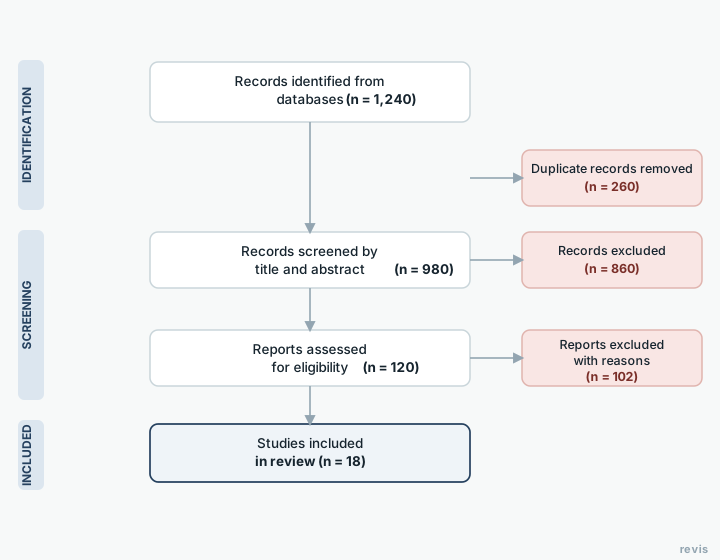
In a systematic review a reference manager matters even more. When you export results from several databases for systematic reviews (PubMed, Scopus, Web of Science), the manager lets you bring all those records together in one place and, above all, detect and remove duplicates before screening starts. That count of imported references and removed duplicates is exactly the number you will later have to enter in the PRISMA flow diagram, so working with a manager from day one saves you trouble.
The questions "what is Mendeley" and "what is Zotero" have the same basic answer. Both are reference managers. The difference is in how they do it, who develops them and what their limits are.
Mendeley features, Mendeley Cite and the Word plugin
Mendeley is a reference manager developed by Elsevier, the scientific publisher behind Scopus and ScienceDirect. It is free on its base plan, runs on Windows, macOS and Linux through its desktop app (Mendeley Reference Manager) and syncs your library to the cloud so it is available on several computers.
Its strengths:
- Built-in PDF reader. You can open articles inside the app itself, highlight them and add notes that stay saved with each reference. For many people this is the main reason to use Mendeley.
- Mendeley Cite. This is the current citation add-in for Microsoft Word. You install it from the Office add-in store, and it works with both the desktop and web versions of Word. With Mendeley Cite you search for the reference, insert it in the text, and the bibliography builds and updates itself. It replaces the old "Mendeley Cite-O-Matic" plugin, so when someone searches for how to use Mendeley in Word, what they need today is Mendeley Cite.
- Simple importing. It has a browser importer (Mendeley Web Importer) for saving references from the web, and it imports RIS, BibTeX and similar files exported from databases.
- Elsevier integration. It connects with Scopus and ScienceDirect, the publisher's catalog of scientific literature.
Limits to keep in mind:
- It is proprietary software. It is not open source, so you depend on Elsevier's decisions about the product. Mendeley has in fact reorganized its apps over time (retiring the classic desktop version in favor of Reference Manager), which has caused friction with long-time users.
- Limited cloud storage. The free plan includes a storage quota. If you manage many full-text PDFs you can run short and need a paid plan with more storage.
- Account required. You need an Elsevier account to sync.
To download Mendeley, always go to the official website and install both the Reference Manager app and, inside Word, the Mendeley Cite add-in from the Office store.
Zotero features and browser connectors
Zotero is an open-source, nonprofit reference manager, originally developed in a university setting (the Center for History and New Media) and maintained by the Corporation for Digital Scholarship. It is free, cross-platform (Windows, macOS, Linux) and, because it is open, it does not depend on any commercial publisher.
Its strengths:
- Browser connectors (Zotero Connector). This is probably its best feature. You install the extension in Chrome, Firefox, Edge or Safari and, with a single click in the browser toolbar, Zotero captures the reference you are looking at (an article in PubMed, an entry in Google Scholar, a book in an online bookstore) with its metadata and, when possible, the attached PDF. The connectors recognize the type of resource and adjust the fields to match.
- Smart capture of multiple results. From a search results page you can select several records and import them at once, which is very handy when you pull results from a database.
- Citation styles and word processor plugins. Zotero installs plugins for Microsoft Word, LibreOffice and Google Docs, and it includes thousands of citation styles (APA, Vancouver, IEEE and many more) through the Zotero Style Repository. Switching style is instant.
- Extensible. Because it is open source, it has an ecosystem of third-party plugins (for example, to improve PDF management, generate reports or connect it to other tools).
- Flexible storage. Zotero gives you a free cloud storage quota to sync your PDFs and attachments, and you can pay to expand it if you need more. It also lets you use your own storage (file syncing via WebDAV or external services) if you would rather not pay, something Mendeley does not offer.
Its limits:
- More basic PDF reading. Zotero includes a PDF viewer and annotation, but its reading experience has traditionally been less polished than Mendeley's, although it has improved a lot.
- Initial learning curve. The power of plugins and custom syncing can feel overwhelming at first if you only want "the basics".
To download Zotero, go to the official website, install the desktop app and, separately, the connector for your browser. That connector is what makes the difference day to day.
EndNote (the paid alternative)
EndNote is the leading paid reference manager in academia, developed by Clarivate, the company behind Web of Science. It is not free (it is sold under license, although many universities have institutional licenses for their community), so its typical users are institutions, research groups with a budget and authors who need advanced features.
What it adds compared with the free options:
- Advanced features for managing very large libraries, strong deduplication and tools built for large-scale review workflows.
- Integration with Web of Science and with its full-text finder (Find Full Text), which tries to locate and download the PDFs for your references automatically.
- The "Cite While You Write" plugin for Word, the equivalent of Mendeley Cite, very mature and widely used in scientific publishing.
- Support and training backed by a commercial vendor.
Its big drawback is cost. Without an institutional license, the outlay is considerable compared with Mendeley or Zotero, which are enough for most students and researchers without paying anything. So before you weigh "Zotero or EndNote", check whether your university gives you access to EndNote and whether you really need its advanced features.
Whichever manager you pick, the next step happens in revisia. Import your references and go straight to screening. Create your free account.
Comparison table (price, storage, collaboration, citing in Word)
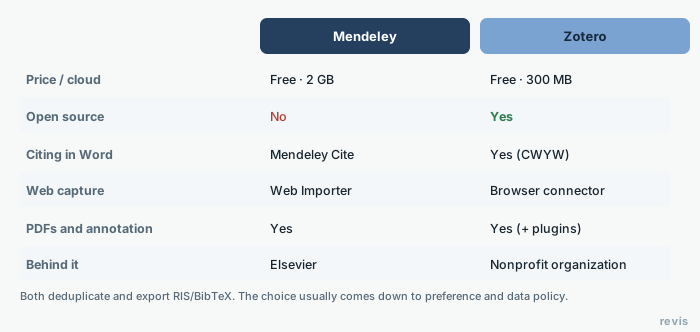
The table below sums up the criteria that matter most when choosing. Specific storage quotas change over time, so confirm them on each tool's official website before you decide.
| Criterion | Mendeley | Zotero | EndNote |
|---|---|---|---|
| Developer | Elsevier (commercial) | Corporation for Digital Scholarship (nonprofit) | Clarivate (commercial) |
| Model | Proprietary, free plan | Open source and free | Paid (institutional licenses are common) |
| Base price | Free plan; paid extra storage | Free; paid extra storage | Paid license |
| Web capture | Web Importer (browser extension) | Zotero Connector (one of its strengths) | Browser and Web of Science capture |
| Citing in Word | Mendeley Cite (Office add-in) | Plugin for Word, LibreOffice and Google Docs | Cite While You Write |
| PDF reading and annotation | Very good, built in | Good, much improved | Good |
| Cloud storage | Limited free quota, paid upgrades | Limited free quota, paid upgrades or your own storage (WebDAV) | Its own sync, aimed at institutional use |
| Collaboration / groups | Private groups (limited on the free plan) | Unlimited groups, public or private | Library sharing (depends on version/license) |
| Operating systems | Windows, macOS, Linux | Windows, macOS, Linux | Windows, macOS |
| Customization | Limited | High (third-party plugins) | Medium |
Zotero wins on web capture and open philosophy. Mendeley stands out for its built-in PDF reader. EndNote only pays off if you get it free through your university or need its advanced features.
Zotero vs Mendeley: which one to choose for your case
There is no single winner in the Zotero vs Mendeley comparison. It depends on how you work:
- Choose Zotero if you value free software, care about independence from a publisher, capture a lot of references from the browser and from databases, or want to collaborate in groups without limits. For systematic reviews and for undergraduate theses and master's dissertations, it is what many university libraries recommend today.
- Choose Mendeley if you read and annotate a lot inside the manager itself and want a comfortable all-in-one PDF reader, or if you already work in the Elsevier ecosystem (Scopus, ScienceDirect).
- Choose EndNote if your institution gives you the license for free and you need to manage huge libraries with advanced deduplication and deep Web of Science integration.
In reviews with several authors, all three let you cite in Word. The question "how do I cite in Word with Mendeley?" gets an equally good answer from Mendeley Cite, from the Zotero plugin or from EndNote's Cite While You Write. The difference lies in reference capture, storage and collaboration, not in inserting citations.
If you want to go deeper into where to search before you import anything into your manager, read our guide to databases for a systematic review, because choosing your sources well shapes everything else.
How to fit it into your review workflow
The reference manager connects the search to screening. An orderly workflow looks like this:
- Search and export. You run your search strategy in each database and export the results as RIS or BibTeX.
- Import into your manager. You load all those files into Mendeley or Zotero, in a collection set aside for the review.
- Remove duplicates. You use the manager's duplicate detection to clean out records repeated across databases. Write down how many you remove. That number goes into the PRISMA diagram.
- Move on to screening. You export the cleaned library (again as RIS) to your study selection tool. This is where screening tools such as Rayyan and Covidence come in: they take that reference file and let you select studies by title, abstract and full text, ideally with blinded dual screening.
- Cite as you write. When you write the manuscript, you go back to the manager to insert citations and generate the bibliography in the style your journal or university requires.
The reference manager stays with the review from the first import to the final bibliography. If you want to see how each phase fits into the whole, read our complete guide on how to do a systematic review step by step, which walks through the process from start to finish.
Once you have your references, in revisia you screen them with artificial intelligence, and every uncertain call goes to a human. Create your free account and try it.
Frequently asked questions
What is Mendeley?
Mendeley is a free reference manager developed by Elsevier. It lets you save and organize references, read and annotate PDFs inside the app itself (Mendeley Reference Manager), sync your library to the cloud and cite in Word with the Mendeley Cite add-in.
What is Zotero?
Zotero is a free, open-source reference manager maintained by the Corporation for Digital Scholarship. It captures references from the browser with the Zotero Connector, organizes your library into collections and tags, and lets you cite in Word, LibreOffice and Google Docs.
What are Mendeley and Zotero used for?
Mendeley and Zotero are reference managers. You use them to collect the references for your sources, organize them in a library, insert citations while you write in Word or Google Docs and generate the final bibliography in the style you need (APA, Vancouver, IEEE). In a systematic review they also let you gather the results from several databases in one place and remove duplicates before screening.
What is the main function of a reference manager like Mendeley or Zotero?
The main function of a reference manager is to automate reference management. It captures the metadata of each source (authors, title, year, DOI), organizes it into folders or collections, inserts citations through an add-in and generates the bibliography without you typing it by hand. It also lets you switch citation style in seconds.
Can I move my library from Mendeley to Zotero?
Yes. You can export your references (for example as RIS or BibTeX) and import them into the other manager, then check that your PDFs and notes came across.
Do reference managers detect duplicates?
Yes. Both Mendeley and Zotero detect and merge duplicate references, a necessary step when you combine results from several databases.
Do they work with Google Docs or only with Word?
Zotero has a Google Docs integration as well as Word and LibreOffice. Mendeley focuses on Word through its citation add-in.
Which is better, Mendeley or Zotero?
It depends on your priority. Zotero wins on browser capture, open-source philosophy and group collaboration, and it is the default recommendation at many university libraries. Mendeley wins on reading and annotating PDFs inside the program. Both are free on their base plan and both let you cite in Word, so the best way to decide is to try each one for a week with your own references.
Is Mendeley free?
Yes. Mendeley has a free plan that covers what most students and researchers need. It includes the desktop app, the PDF reader, syncing and citing in Word with Mendeley Cite. What the free plan limits is cloud storage and group size. If you need more, there are paid plans with extra storage.
How do I cite in Word with Mendeley?
Install the Mendeley Cite add-in from the Microsoft Word add-in store (Insert > Add-ins) and sign in with your account. Place the cursor where you want the citation, search for the reference in the Mendeley Cite panel, insert it and, when you finish, generate the bibliography. Mendeley Cite builds it and keeps it up to date automatically. It replaces the old Cite-O-Matic plugin.
Zotero or EndNote?
Zotero is free, open source and enough for almost any student or researcher. EndNote is paid and only pays off if your institution provides the license or if you need to manage very large libraries with advanced features and tight integration with Web of Science. For an undergraduate thesis, a master's dissertation or a standard systematic review, Zotero is usually the sensible choice.