Method / Search
Literature search strategy: Boolean operators, MeSH terms and truncation
How to use Boolean operators (AND, OR, NOT), MeSH and DeCS terms, truncation and thesauri to build a reproducible literature search strategy, with examples.
A literature search strategy is the set of terms, Boolean operators and filters you use to retrieve every relevant study from a database in a systematic, reproducible way. Boolean operators (AND, OR, NOT) are the words that combine your terms to broaden or narrow what you retrieve. Typing a few words into PubMed is not enough. A strategy is a documented recipe that anyone else could run again and get the same results. In a systematic review, the literature search is the stage with the biggest impact on the validity of the work, because if you don't find a study, you simply can't include it. That is why it has to be built with method, combining concepts, synonyms, controlled vocabularies and a clear search string.
That method means combining Boolean operators (AND, OR, NOT), using truncation and wildcards, relying on MeSH and DeCS terms, and documenting every step so you meet PRISMA.
What a search strategy is (and why it must be reproducible)
The search strategy is the plan that turns your research question into concrete search strings for each database. It has two competing goals that you have to balance:
- Sensitivity (recall). Retrieve as many relevant studies as possible, even if that brings noise. In a systematic review, sensitivity comes first. Screening too many articles is better than missing a key one.
- Precision. Most of what you retrieve should be relevant, so you don't drown in thousands of irrelevant references.
What separates a methodical literature search from a casual one is reproducibility. A reproducible strategy meets three conditions:
- Explicit. The search string is written out in full, not summarized.
- Documented. You record the database, the date the search was run, the filters, the syntax and the number of results.
- Transferable. It can be adapted to other databases while keeping the same conceptual logic.
The Cochrane Handbook and the PRISMA 2020 statement require you to report the full search strategy for every database searched (usually in the supplementary material). If you can't copy and paste your search string so someone else can rerun it, what you have for now is a hunch, not a strategy.
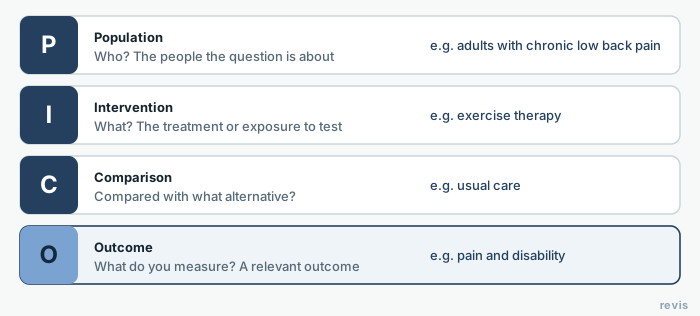
Before you write anything, settle your research question. If you haven't structured it yet, start by defining the PICO question for your review, because each component (population, intervention, comparison and outcome) will later become a block in your search string.
Boolean operators AND, OR and NOT
Boolean operators are the three words (AND, OR, NOT) that connect your terms and tell the database how to combine them. Most academic search engines (PubMed, Scopus, Web of Science) expect them in capitals, so the system reads them as operators and not as search words.
AND narrows the search
AND retrieves only records that contain every term. It reduces the number of results and raises precision. You use it to cross different concepts.
This string crosses three concepts.
diabetes AND exercise AND glycated hemoglobin
It only returns articles where all three concepts appear. The more ANDs you add, the narrower the result.
OR broadens the search
OR retrieves records that contain at least one of the terms. It increases the number of results and the sensitivity. You use it to group synonyms and variants of the same concept.
This string pulls together several synonyms.
exercise OR "physical activity" OR training OR "physical exercise"
All of those expressions describe the same concept, so you join them with OR to avoid losing any study that uses one or the other.
NOT excludes terms
NOT removes records that contain a term. It raises precision, but use it with care. It is the easiest way to lose relevant studies without noticing, because a relevant article may mention the excluded term in passing.
This string tries to exclude studies in mice.
breast neoplasms NOT mouse
Here you are trying to drop animal studies, but a human trial that cites a mouse model in its introduction would be left out. In systematic reviews it is usually better to filter species with the database's limits than with NOT.
Nesting with parentheses
A real search string is built by nesting blocks with parentheses, just as in math. Each concept is built with OR between synonyms and wrapped in its own parentheses. Then the concepts are crossed with AND. The full string looks like this.
(diabetes OR "type 2 diabetes mellitus" OR T2DM)
AND
(exercise OR "physical activity" OR training)
AND
("glycated hemoglobin" OR HbA1c OR "glycemic control")
This is the canonical structure of any search strategy: blocks of synonyms joined with OR and concepts crossed with AND.
| Operator | What it does | Example |
|---|---|---|
| AND | Narrows. Retrieves records with every term (intersection) | obesity AND adolescents |
| OR | Broadens. Retrieves records with at least one of the terms (union, for synonyms) | obesity OR overweight OR "body mass index" |
| NOT | Excludes. Drops records that contain the term (subtraction) | obesity NOT surgery |
| ( ) | Nests. Groups blocks to control the order of combination | (obesity OR overweight) AND (diet OR exercise) |
Truncation, wildcards and phrase searching
Boolean operators handle the logic between concepts. The following tools help you capture every morphological variant of each word without typing them one by one.
Truncation
Truncation replaces the ending of a word stem with a symbol (usually the asterisk *) to retrieve every word that starts with that stem. It is one of the most useful ways to gain sensitivity.
nurs*
This retrieves nurse, nurses, nursing, nursed, and so on. Be careful not to truncate too early. car* would bring cardiac, but also career, carbon and caries, and a lot of noise with them.
Wildcards
A wildcard replaces a single character (often ? or #, depending on the database) inside a word. It handles spelling variants, especially between British and American English.
randomi?ed
This retrieves both randomised and randomized. Depending on the system, it also handles other spelling variants, such as words with and without accents.
Phrase searching
Quotation marks force the database to search for the words together and in that exact order. You need them for compound terms.
"physical activity"
"health-related quality of life"
Without quotation marks, many search engines apply an implicit AND between the words and retrieve records where they appear separately, and precision suffers.
Watch out. Each database uses its own syntax. The asterisk is almost universal for truncation, but wildcards, quotation marks and the minimum stem length change from one system to another. Always check the database's help pages before you trust your search string.
Struggling to get from the question to the search string? In revisia the search strategy is built step by step from your PICO and run against several sources at once. Create your free account.
Controlled vocabularies: MeSH and DeCS
So far we have searched with natural language (the words as they appear in the text). The problem is that the same concept goes by many names. "Myocardial infarction", "heart attack", "MI", "AMI". If you rely only on keywords, you will miss the articles that use a synonym you didn't think of.
Controlled vocabularies solve this. They are standardized lists of terms (descriptors) that indexers assign to each article based on its content, not its wording. Searching with a descriptor retrieves every study on that concept, whatever they call it.
MeSH in PubMed
MeSH (Medical Subject Headings) is the National Library of Medicine thesaurus that indexes MEDLINE/PubMed. Every PubMed article is assigned several MeSH terms. The advantages:
- You retrieve all the synonyms at once by using the descriptor.
- You can use hierarchical explosion (explode). When you search a MeSH term, PubMed by default also includes all the narrower terms below it in the tree. For example, the descriptor
Cardiovascular Diseasesexpands toHeart Diseases,Myocardial Infarction, and so on. - You can narrow by subheadings such as
/drug therapy,/diagnosisor/epidemiology.
In PubMed syntax, a MeSH term is tagged with [Mesh].
"Diabetes Mellitus, Type 2"[Mesh] AND "Exercise"[Mesh]
A robust strategy combines controlled vocabulary and natural language, because the most recent articles are not yet indexed with MeSH.
("Diabetes Mellitus, Type 2"[Mesh] OR "type 2 diabetes"[Title/Abstract] OR "DM2"[Title/Abstract])
AND
("Exercise"[Mesh] OR "physical activity"[Title/Abstract] OR "exercise"[Title/Abstract])
DeCS for Spanish- and Portuguese-language sources
DeCS (Health Sciences Descriptors) is the trilingual controlled vocabulary (Spanish, Portuguese and English) that BIREME develops from MeSH, expanded with concepts specific to regional health. It is the MeSH equivalent for Ibero-American databases such as SciELO and LILACS.
DeCS lets you search with Spanish or Portuguese descriptors and retrieve literature that is not in PubMed. Here is an example string with DeCS descriptors in Spanish.
("Diabetes Mellitus Tipo 2" OR "diabetes tipo 2")
AND
("Ejercicio" OR "actividad física")
The MeSH/DeCS relationship is direct. Most DeCS descriptors have an equivalent MeSH descriptor, which makes it easy to translate the same strategy between international databases and Spanish-language ones.
Thesauri and descriptors
A thesaurus is the structured dictionary the descriptors come from. Unlike a simple alphabetical list, it organizes terms into hierarchies and relationships. Understanding its structure greatly improves your literature search.
Every thesaurus defines three types of relationships between terms:
- Hierarchical. Broader term (BT) and narrower term (NT). This is where the explode function comes from.
- Equivalence. Synonyms and variants that point to the preferred descriptor (the entry "heart attack" sends you to "myocardial infarction").
- Associative. Related terms (RT) that suggest neighboring concepts you may not have considered.
How to use the thesaurus in practice:
- Look up each concept from your question in the database's thesaurus (the MeSH Browser for PubMed, the DeCS browser for Spanish- and Portuguese-language sources).
- Note the preferred descriptor, its synonyms (which you will use as natural-language keywords) and its related terms.
- Decide whether to explode the descriptor or restrict it to the exact concept.
The most widely used thesauri in the health sciences are MeSH (PubMed/MEDLINE), DeCS (SciELO, LILACS), Emtree (Embase) and CINAHL Subject Headings (CINAHL). Each database has its own, and that is exactly why the same search has to be rewritten for each one.
How to build the search string from your PICO
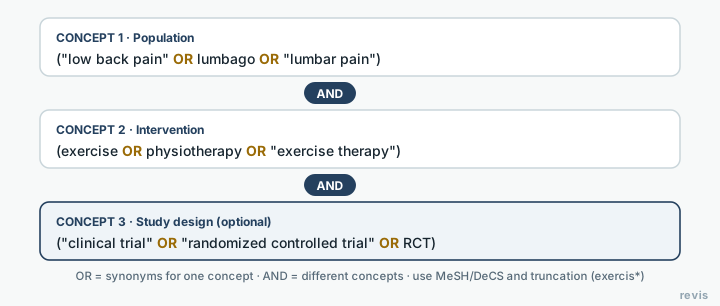
The search string comes straight from your research question. If you have structured your PICO question well, your conceptual blocks are already done. The process is systematic:
- Identify the key concepts. Take the PICO components. For most reviews two or three concepts are enough, typically Population and Intervention (Comparison and Outcome tend to cut sensitivity if you add them to the search, so they are often kept for screening the articles).
- Gather the synonyms for each concept. For each block, list natural-language keywords and the thesaurus descriptors (MeSH/DeCS). This is where controlled vocabulary pays off.
- Join the synonyms with OR. Each concept becomes a set of parentheses with all its terms linked by
OR. - Cross the concepts with AND. Combine the parentheses with
ANDso the result contains every concept. - Add truncation, wildcards and filters. Refine with
*, quotation marks and the database's limits (dates, language, study type).
A worked example from a PICO question. "In adults with type 2 diabetes (P), does physical exercise (I) improve glycemic control (O)?"
(diabet* OR "type 2 diabetes mellitus" OR T2DM OR "diabetes tipo 2")
AND
(exercis* OR "physical activity" OR training OR ejercicio OR "actividad física")
AND
("glycemic control" OR "glycated hemoglobin" OR HbA1c OR "control glucémico")
This is your master search string. From it you generate the specific version for each database. (The Spanish synonyms are there on purpose: they pick up records indexed in Spanish-language sources.)
Adapting the search to each database
The same conceptual strategy has to be rewritten for each source, because each one has its own thesaurus, field tags and syntax. Copying and pasting the same string into all of them is not enough. You have to translate it. These are the things that change from one database to another:
- The controlled vocabulary.
[Mesh]in PubMed, Emtree in Embase, DeCS in SciELO/LILACS, CINAHL Subject Headings. - The field tags.
[Title/Abstract]in PubMed is equivalent toTITLE-ABS-KEY( )in Scopus orTS=( )in Web of Science. - The truncation symbol and the wildcards.
- How you nest and combine lines (some databases number each search and then combine them by line number).
To decide which sources to search and how the syntax translates in each one, see the guide to databases for systematic reviews, which covers how many and which ones to search according to PRISMA and Cochrane recommendations.
How to document the search for PRISMA
Documenting the search is a methodological requirement, not an optional step. PRISMA 2020 item 7 asks you to "Present the full search strategies for all databases, registers and websites, including any filters and limits used" (a stricter requirement than PRISMA 2009, which asked for at least one). For each source, record:
- The name of the database and the platform or interface (for example, MEDLINE via PubMed).
- The full search string, copied verbatim, not shortened.
- The date the search was run.
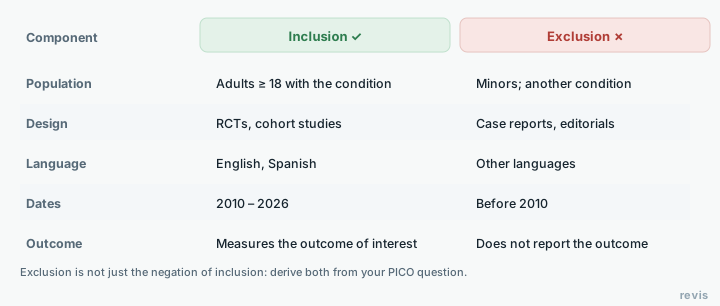
- The filters and limits applied (publication dates, language, study type).
- The number of results from each database.
Those numbers feed directly into the "records identified" count of the PRISMA flow diagram. Keep the strings in a table in the supplementary material. That way your literature search is documented, can be audited, and any reader can reproduce it.
To see how the search strategy fits into the whole process, from the question to the synthesis, go back to the guide on how to do a systematic review step by step.
In revisia your search strategy is versioned and reproducible, ready for the PRISMA appendix. Create your free account.
Frequently asked questions
What is truncation in a search?
Using a symbol (often an asterisk) at the end of a word stem to retrieve all its variants. For example, therap* finds therapy, therapies and therapeutic.
What are quotation marks for in a search?
To search for an exact phrase. Putting an expression in quotation marks retrieves those words together and in that order, not separately.
Do I have to adapt the search string to each database?
Yes. Each database has its own syntax, fields and controlled vocabulary, so the same strategy is translated for each one and documented separately.
What are Boolean operators?
Boolean operators are three words (AND, OR, NOT) that combine your search terms in a bibliographic database. AND narrows the search because every term must appear, OR broadens it because one term is enough (ideal for synonyms), and NOT excludes records that contain a term. Combined with parentheses, they let you build precise, reproducible search strings.
What is a MeSH term?
A MeSH (Medical Subject Headings) term is a descriptor from the National Library of Medicine thesaurus that PubMed/MEDLINE uses to index each article by its content, regardless of the exact words in the title or abstract. Searching with a MeSH term retrieves every study on that concept even when they use different synonyms, and lets you use the hierarchical explosion to include narrower terms from the tree.
What is the difference between MeSH and DeCS?
MeSH is the English-language thesaurus of the National Library of Medicine that indexes PubMed/MEDLINE. DeCS (Health Sciences Descriptors) is its trilingual equivalent (Spanish, Portuguese and English), developed by BIREME from MeSH and expanded with regional health concepts. DeCS is used in Ibero-American databases such as SciELO and LILACS, and most of its descriptors have a MeSH equivalent, which makes it easy to carry the same strategy across international and Spanish-language sources.
How do I document the search strategy for PRISMA?
PRISMA 2020 requires you to report the full search strategy for every database you searched (PRISMA 2009 asked for at least one). Record five things for each source: the database name and platform, the search string copied verbatim, the date you ran it, the filters and limits applied, and the number of results. Put these strings in the supplementary material and use the counts to build the PRISMA flow diagram. That way your literature search is documented, auditable and reproducible.